

A Google My Business (GMB) listing accounts for 25% of your company's organic search ranking1. This free tool provided by Google is therefore not something to overlook in your local SEO strategy. To attract customers to your store and grow your turnover, you need to be visible online, particularly in response to users' local queries. How can you achieve this ? Here are our top tips for boosting your local SEO using GMB.
| 👉 Article updated in July 2026. |
Pas le temps ? Demandez à l'IA de résumer de l'article :
.png?width=730&name=Banni%C3%A8re%20article%20%20(4).png)
1. Google My Business in a nutshell
GMB is a free tool created by Google and made available to all business owners. By filling out your GMB profile, you provide Google with valuable data that is then presented to internet users. It is essential for your local SEO and your presence management strategy—meaning your visibility when users submit local queries. For instance, "Maison du Monde Rennes", "Café at Mont-Saint-Michel", or "Bookshop near me" are local searches because they include a geographical indicator.
When a user types this type of query, Google pulls from its database to display the most relevant information, taking into account the user's location and other ranking factors.
.png?width=730&name=Banni%C3%A8re%20article%20%20(5).png)
2. Understanding search results to effectively optimise your local SEO
A local search yields three types of results :
-
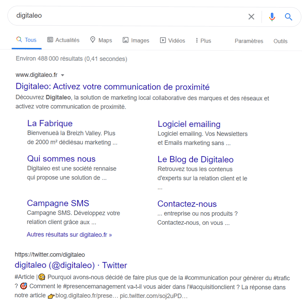
Search results : These are the traditional links displayed one after another across multiple pages. In SEO jargon, this is referred to as the "SERP". They are links to pages deemed most relevant to answer the user's query.
- Maps results : These are the results displayed on the Google Maps interactive map. If your business is properly indexed, it should appear here.
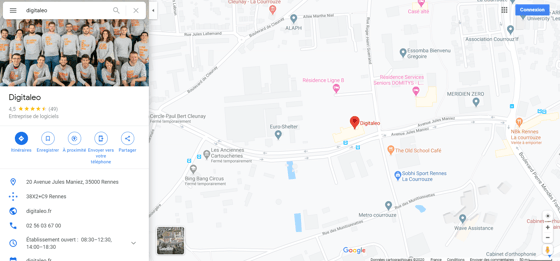
- Knowledge Graph results : These usually appear above standard Search links and are arranged dynamically by Google. By clicking on them, users access a range of information related to their query without leaving the search engine.
.png?width=417&name=Capture3%20(2).png)
To display all these results, Google scans its database for indicators that help determine whether your website or physical store can relevantly answer the user's query. To do this, it needs as much high-quality, up-to-date information as possible.
Then, among all the results it offers, the ranking is determined by three criteria :
-
Relevance : Is the information you provide tailored to the user's request?
-
Prominence (Importance) : What is your business's authority compared to competitors? Is it a popular venue?
-
Distance : Is your business close to the user's current location?
To satisfy these three criteria, Google's algorithm evaluates a vast number of factors. From your GMB profile title to customer reviews, backlinks to your website, and photos featured on your GMB page, the list is far from exhaustive. Although no one knows the exact magic formula for reaching top spot, there are nonetheless a few rules to follow to improve your search engine ranking.
To find out more, download our eBook "Presence management: How to drive store footfall in 5 steps".
.png?width=730&name=Banni%C3%A8re%20article%20%20(7).png)
3. Key elements to optimise your local SEO
Most of the information Google needs to provide users with optimal answers to their queries can be found on GMB profiles—hence the importance of keeping them up to date. Because the algorithm is constantly seeking high-quality content to display to users, only businesses that grasp the importance of Google My Business optimisation succeed in leveraging the tool to their advantage and driving in-store footfall.
Here are a few tips to help you achieve this :
-
Thoroughly create and complete profiles for all your outlets
-
Keep them up to date and enrich them regularly
-
Harmonise your GMB profiles if you operate a retail network with multiple stores
Describe your store and business activity accurately
Once that is done, take the time to describe your stores thoroughly. Enter a title—namely your shop name—and aim to remain consistent if you manage a retail network. Other elements that help users better understand your business can be specified in categories, subcategories, and attributes.
Categories and subcategories relate directly to your line of work, for instance: "shoe shop" or "hair salon". Attributes, on the other hand, allow you to refine the list of services available at the store. For example, a restaurant or café might include attributes like "outdoor seating" or "smoking area".
Next, write your store description. Make full use of the character limit and incorporate keywords (or key phrases) into your copy to optimise your ranking.
Then, include a link to your website. If you operate multiple shops, link directly to each store's individual page where available, or redirect users to your store locator. Here again, effective optimisation hinges on the accuracy of the information you provide. Do not overlook opening hours; this information is among the most critical for users, and by extension, for your SEO. Specify your standard business hours as well as special opening hours during public holidays, for instance.
Keep your page active
Another key area to focus on for local SEO: keep your page active by posting photos and videos aligned with your brand identity, expertise, point of sale, and network management strategy, while sharing updates using Google Posts! These features foster customer interaction while providing details that help users make informed decisions and visit your store.
Engage with your customers
Finally, do not forget to manage customer reviews. These are vital to your company's reputation. 72% of consumers do not make a decision before reading feedback from other customers2, and 15% do not trust businesses with no reviews at all3. In short, encouraging your customers to leave reviews for your business—and demonstrating that you value their feedback—is essential. Reply to all reviews, or at the very least to negative ones. Having a few negative comments is not necessarily bad, as 95% of users distrust a business that has none4. Show prospective clients that you can handle challenging situations and resolve issues to satisfy unhappy customers. Reviews build your reputation; the higher the volume and proportion of positive reviews, the higher you will climb in search results.
.png?width=730&name=Banni%C3%A8re%20article%20%20(9).png)
Conclusion
To optimise your local SEO, you must provide high-quality, up-to-date information to web users. At a time when 97% of consumers instinctively check online when looking for a local business5, completing and optimising your Google My Business profile is an absolute prerequisite for your organic search strategy alongside your local digital communication plan.

References :
1 - Participation de GMB au référencement naturel
https://moz.com/local-search-ranking-factors
2 -Prise de décision avant lecture des reviews
https://mytestimonialengine.com/how-reviews-affect-purchasing-decisions-and-seo/
3 -Confiance et reviews
https://statuslabs.com/reputation-management-stats-2020/
4 -Le positif des avis négatifs
https://blog.reevoo.com/ebook-bad-reviews-good-business/
5 - Habitudes des internautes
https://www.hubspot.com/marketing-statistics

.png)


.png)